


Quick Start
/ Activating Altium Platform
Completed
Sign In To Save Your Progress
Click if you find this content useful
Quick Start
Activating Altium Platform
An Altium Workspace is a dedicated and secure Cloud Workspace environment for your design projects. In this environment, you can store, version, and organize your design data and collaborate with others.
Before you can store projects and collaborate, you need to activate a Workspace.
You can start Workspace activation from:
- The Workspace section on the Altium website
- Your Altium Account profile page
- Inside Altium Designer, when a feature requires a Workspace connection
In any of these locations, click the option to activate a Workspace. You will be taken to a web page to complete the setup.
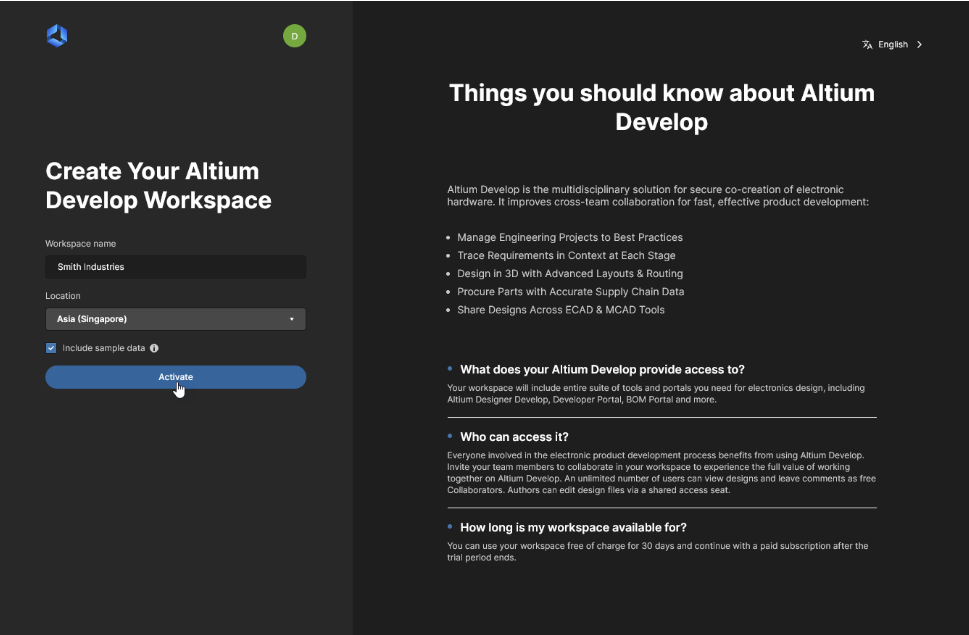
To activate your Workspace:
- Enter a name for your Workspace (this is pre‑filled by default)
- Select the location closest to you from the drop‑down list
- Leave the option to include sample data enabled (recommended for learning)
- Click Activate
Once activated, the Workspace will be ready to use from within Altium Designer for project storage, assignments, and collaboration.
