News & Updates

NEW

Blog
•
Avoid Costly Interconnect Errors: Essential Multiboard PCB Layout Strategies for Reliable Designs
Complex multiboard designs demand more than just connecting boards together. They require every interface to work flawlessly under real-world conditions. Discover how better pin assignments, return paths, and mechanical planning can dramatically improve reliability and reduce rework.

NEW

Blog
•
BOM Cost Optimization During Schematic Capture
Engineering and sourcing teams work best when BOM decisions happen with live market data in view. This article explains how integrated cost and availability insights help teams collaborate earlier and avoid redesigns driven by supply chain issues.

Blog
•
Why ECAD–MCAD Collaboration Is Essential to Design for Manufacturability (DFM)
Poor ECAD-MCAD coordination often leads to enclosure conflicts, connector misalignment, and costly redesigns. This article shows how integrated collaboration helps teams catch manufacturability issues earlier and keep projects moving smoothly.


Blog
•
Registration Tolerance Is Now a Design Constraint, Not a Fab Problem
Ultra HDI is changing the rules of PCB design and registration tolerance is now part of the design conversation from day one. Discover how smarter spacing, stackup planning, and collaboration with fabricators can dramatically improve manufacturability and reliability.


Blog
•
How to Use a Multicad Viewer for Seamless Collaboration
Because ECAD formats are typically incompatible, teams often struggle with versioning, conversions, and fragmented review processes. This article breaks down how multi-CAD viewers provide a unified, read-only environment that supports structured design reviews, comments, and task assignment across disciplines.


Blog
•
Best Online ECAD File Viewers for Engineers and PCB Designers
Sharing PCB designs doesn’t have to be complicated. Check out the best online ECAD viewers that let anyone view and collaborate on designs right from a browser.


Blog
•
Rigid-Flex PCBs in Consumer Electronics
Rigid-flex PCBs help modern devices get smaller, lighter, and more compact by eliminating connectors and fitting into tight 3D spaces. This article explains how to design them properly to avoid common reliability issues.

Blog
•
From Design to First Assembly: Complete Your BOM & Plan Your Build
This webinar walks through the complete post-release workflow, from generating a managed BOM to sourcing components and assembling the first prototype. It demonstrates how integrated tools streamline data enrichment, supplier selection, and guided assembly to reduce delays and errors.

Blog
•
The Future of BOM Management: Trends and Innovations
BOM management is no longer just a checklist. It’s becoming a real-time engine for smarter decisions! Discover how AI, automation, and connected systems are transforming BOMs into powerful tools for navigating supply chain uncertainty.


Blog
•
How to Use a Multicad Viewer for Seamless Collaboration
Working across different ECAD tools can make design reviews messy and inefficient. This article shows how a multi-CAD viewer simplifies collaboration by letting teams view, comment, and manage designs in one place.

NEW

Blog
•
Breaking the Multiboard Bottleneck: How Unified Design Solves ECAD–MCAD Disconnects
This article examines how fragmented ECAD-MCAD workflows create costly misalignments, late-stage conflicts, and inefficiencies in multiboard system design. It shows how unified, collaborative platforms enable real-time synchronization, digital twins, and cross-domain visibility to eliminate rework and streamline development.

Blog
•
Pi.MX8 Project - Board Layout Part 1
Our exploration of the Pi.MX8 open-source computer module project progresses. In this third chapter, our focus shifts to the PCB layout preparation of the board. Key topics include defining the layerstack and component break-out routing.

Blog
•
PCB CoDesign Whitepaper
Design faster together with the innovative PCB CoDesign feature, exclusively available in Altium Designer. This cutting-edge functionality seamlessly integrates schematic and PCB design, facilitating concurrent work by multiple engineers on the same project. Learn more about this groundbreaking feature in our comprehensive manual.

Blog
•
How to Test Suspect Electronic Components
Electronic components power nearly everything in our modern lives. However, as long as there are buyers for parts, counterfeiters will persist in their endeavors. Financial losses resulting from fake components are challenging to ascertain due to enforcement limitations and the difficulty in collecting data on the issue. In this article, we demonstrate how to test and verify components in batch orders.

Blog
•
The Positive Impact of Supply Chain Visibility on Design to Cost
With increased electronics supply chain visibility, you can develop better products faster and align perfectly with budget constraints early on. Here’s why.

Blog
•
What Most Agile "Gurus" Get Wrong About Hardware Development
Explore common myths about Agile hardware development and learn how to adapt Agile principles for hardware projects.

Blog
•
Design Phase – Lid Assembly Electronics Part 2
We are going deeper into lid assembly electronics in our Open Source Laptop project. In this chapter we will tackle the PCB design of the webcam board and show you how to deal with some expected challenges, such as overall small form factor of the board or breaking out the microscopic webcam image sensor.

Blog
•
Compare Commercial Altium 365 vs Altium 365 GovCloud
If you're trying to understand how commercial Altium 365 differs from Altium 365 GovCloud, you're in the right place. Click to grasp the unique features of each.

Blog
•
5 Ways Hardware Development Is Just… Different
Explore the challenges and strategies of implementing Agile methodology in electronics hardware development. Understand key differences between hardware and software development within the Agile framework.

Blog
•
Flexible Circuit Assembly: Thinking Through Component Placement
The flexible circuits are ideal for applications where a thin, small, and lightweight PCB is needed. However, in such cases, challenges in assembly and fabrication often arise. This article delves into these challenges, focusing on component selection and placement and how they can significantly impact the performance of the flexible circuit in its intended application.
Blog
•
Coding Your Own Networked Test Equipment
Have you ever performed manual tests? If your answer is yes, you're likely aware of how laborious and time-consuming the entire process can be. Allow us to introduce you to the realm of test equipment automation. Our new step-by-step guide empowers you to write code that seamlessly configures your networked test equipment, all from the convenience of your computer.
Blog
•
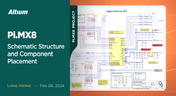
Pi.MX8 Project – Schematic structure and component placement
We are advancing with our brand new Pi.MX8 Project. In this chapter, we delve deeper into two crucial aspects: the overall schematic and component placement on the PCB board. Don't hesitate to check it out. Additionally, you can follow this project through our workspace; the link is provided within the article.
Blog
•
Redefine PCB Boundaries with HDI Design
Dive into the world of High-Density Interconnect (HDI) design to enhance your projects. Explore heightened signal integrity, improved reliability, and the seamless integration of advanced technologies - all within compact and lightweight designs. Discover more about HDI on our updated feature page.
Blog
•
OrCAD Design Collaboration in Altium 365
Ready to start collaborating on your OrCAD projects in a multi-CAD environment? Check how you can use Multi-CAD File Support in Altium 365 in practice.
Blog
•
The Critical Role of Constraint-Based PCB Design in Modern Electronics
A constraint-based approach to PCB design is crucial in today's electronics industry. This article delves deeper into this complex and interesting topic, exploring various types of constraints, their advantages, and providing guidance on implementing them into your PCB design process.
Blog
•
Pi.MX8 Project – Introduction and Overview
Do you have extensive knowledge about the Pi.MX8 module? We're excited to introduce a new series of articles focusing on an innovative approach to utilizing this module. In this inaugural chapter, we provide insights into the preparation for this project and detail the elements that will be used.

Blog
•
How to 'Shift Left' and Connect Procurement and Engineering? Altium 365 BOM Portal Step-by-Step
Learn why BOM management is critical for both procurement managers and electronic engineers. Altium 365 BOM Portal helps to bridge the gap between these worlds. Discover how!



On-Demand Webinar
•
Giu 12, 2025
Proactive Lifecycle Management: Preventing Obsolescence Before It Hits


On-Demand Webinar
•
Apr 23, 2025
Collaborative Design Review: Ensuring Quality from Schematics to Supply Chain

On-Demand Webinar
•
Apr 22, 2025
From Prototype to Production: Optimizing BOM Costs Without Compromising Quality with Part Analytics



On-Demand Webinar
•
Apr 9, 2025
Component Selection in Altium Designer: Making Data-Driven Decisions with Data Integrations

On-Demand Webinar
•
Mar 25, 2025
Unlocking the full potential of your design team with Altium's enterprise solution




On-Demand Webinar
•
Gen 24, 2024
Discover How Altium Designer 24 Revolutionizes Team Dynamics in PCB Design


