Welcome, Guest

Sign in to learn, create, and do more with the product you love.

News & Updates

Filters:
Tag
NEW
Blog
Getting Started for Mechanical Engineers

Explore our collection of MCAD Collaboration walkthroughs, where you’ll discover how to synchronize mechanical constraints and keepouts, maintain traceability with advanced history and revision control, and streamline electromechanical connectivity through harness synchronization. These topics and many more are covered in this article.

NEW
Embedded thumbnail for Working as One for What Matters Most | How Benchmark Unifies Engineering Teams
Altium Stories
Working as One for What Matters Most | How Benchmark Unifies Engineering Teams

See how Benchmark Electronics uses Altium’s collaborative hardware development platform to unify its electrical, mechanical, and software engineering teams. By replacing manual processes, disconnected tools, and siloed workflows with a shared workspace, Benchmark unlocked a new way of working.

NEW
Blog
Are Your ECAD Tools Holding Back Engineers’ Productivity?

The article highlights that productivity issues often stem from tool limitations rather than engineer effort, especially as project complexity grows. ECAD tools that offer clear version control, cross-discipline integration, and workflow awareness are key to sustaining efficiency.

Embedded thumbnail for PCB Design Tips to Improve RF Power Amplifier Layout
How-To's
PCB Design Tips to Improve RF Power Amplifier Layout

Take a deeper look at RF power amplifier PCB design as we expand on our original 6 GHz RF signal generator tutorial with an in-depth design review. Discover essential layout optimization techniques such as switching regulator routing, feedback loop placement, stitching via implementation, and effective copper balancing.

Embedded thumbnail for How Altium's Assembly Assistant unifies Quantum Systems' Dev Process
Altium Stories
How Altium's Assembly Assistant unifies Quantum Systems' Dev Process

Quantum Systems develops unmanned drone systems for aerial intelligence and rapid, field-ready innovation. With the Assembly Assistant, their team streamlined a once tedious prototype build process, eliminating manual exports, file conversions, and unnecessary guesswork.

Embedded thumbnail for Creating Stacking Stripes for PCB Fabrication: Altium Tutorial
How-To's
Creating Stacking Stripes for PCB Fabrication: Altium Tutorial

Watch our new tutorial where we demonstrate how to place stacking stripes along the edge of a PCB and configure design rules to control clearances. In this video, you’ll learn how to create a dummy net, use the query system to apply rules specifically to stacking stripes, and leverage split planes on internal layers.

Embedded thumbnail for Empower Your Designs with Advanced Power Analysis
How-To's
Empower Your Designs with Advanced Power Analysis

Power Analyzer brings clarity. Agile Teams brings control. Combined, they help teams deliver reliable hardware with confidence.

Blog
7 Ways to Catch Rules & Constraints Early – Checklist

Discover seven actionable ways to spot and fix rules and constraint issues before they derail your PCB project. Using Altium Designer Agile, these tips help you build more manufacturable and reliable boards with fewer iterations.

Embedded thumbnail for Component Selection Process Tips for PCB Design
How-To's
Component Selection Process Tips for PCB Design

Explore our new component selection tutorial and learn Zach Peterson’s proven approach to finding and choosing parts that take your electronic designs from good to exceptional.

Blog
Do You Need an IPC-D-356 Netlist?

If your output package is Gerber-based, adding an IPC-D-356 netlist can dramatically improve how your design is reviewed and validated for production. Here’s when it matters, what it contains, and how to generate it quickly in Altium.

Embedded thumbnail for Signal Analyzer by Keysight Promo Video
How-To's
Signal Analyzer by Keysight Promo Video

Design faster, collaborate smarter, and catch signal integrity issues early with Altium Agile Teams and the Signal Integrity Analyzer by Keysight — both integrated directly into Altium Designer Agile. Check out our new promo video to learn more.

Embedded thumbnail for NFC Reader Testing: Flashing and Validating the Project
How-To's
NFC Reader Testing: Flashing and Validating the Project

Join Zach Peterson as we build and test an NFC reader board from start to finish. You’ll see how a custom NFC reader goes from manufacturing to working hardware, with step-by-step guidance on firmware flashing, power checks, and RFID tag detection.

Embedded thumbnail for Power Analyzer by Keysight Promo Video
How-To's
Power Analyzer by Keysight Promo Video

Unlock faster, more reliable PCB design with Altium Designer Agile Teams and Power Analyzer by Keysight. Integrated directly inside Altium Designer, this powerful combination enables fast, secure, and adaptive collaboration helping engineering teams move quickly, stay aligned, and scale confidently. Watch this short video to see how this software improves your PCB design process.

Blog
Avoid These Top 3 Power Distribution Failures in PCB Design

Power distribution issues can silently undermine your PCB’s reliability. This article uncovers the top three failure modes and shows how Power Analyzer by Keysight helps you catch them early in the design phase and how Altium Agile Teams turns those checks into structured team action.

Embedded thumbnail for Do 90-Degree Bends Destroy Signal Integrity? The Surprising Answer
How-To's
Do 90-Degree Bends Destroy Signal Integrity? The Surprising Answer

Discover why the long-held belief about 90-degree PCB traces may be more myth than reality. This video explains key signal integrity principles and uncovers insights that can help you make more informed design decisions.

Tag
How to Fix the Top PCB Design Mistakes
Blog
Beginner PCB Design Mistakes and How To Avoid Them

When starting out with PCB design, it’s common to treat the process as simply ‘connecting the dots’: as long as connections are made, it’s not particularly important how these connections are made. Having reviewed quite a number of PCBs of other PCB design engineers over the last few years, there are common, unfortunately erroneous, occurrences between a lot of them. This article aims to illustrate the top five beginner PCB design mistakes and what we can do to avoid making them. Let’s get started!

Top 5 Questions Regarding Stack Up
Blog
SAP (Semi-Additive PCB Process) – Top 5 Questions Regarding Stack Up

As the PCB design community embraces the benefits of this new printed circuit board fabrication technique, there are of course many questions to be answered.  Today’s blog will address some of the most commonly asked questions related to circuit layer stack up as people are introduced to this new technology.

Design Reuse Blocks Update
Blog
Altium Designer 22.9 Update

We are happy to announce that the Altium Designer 22.9 update is now available. Altium Designer 22.9 continues to focus on improving the user experience, as well as performance and stability of the software, based on feedback from our users. Check out the key new features in the What's New section on the left side of this window!

Dual Rail Voltage Supply
Blog
Dual Rail Voltage Supply

The highest performing operational amplifiers often need a split supply with positive and negative voltages connected to the op amps supply rails. In this project, we’re going to be building a positive/negative dual rail power supply for a differential oscilloscope probe I’m designing. I’m making the power supply a separate project, as a dual rail supply is quite useful to have, and I’m sure I’ll find multiple uses for it in the future.

Library Importer Interface
Blog
Library Importer Improvements (former Library Migrator)

Importing file-based libraries from your local computer or network drive to your Altium 365 workspace can be done using the Library Importer. Altium’s Library Migrator was renamed Library Importer—the feature’s name was changed to conform more closely to the tool’s purpose. Not only is its name new, but our team has also made several user experience improvements. We have updated the documentation to reflect this change.

Blog
How to Select Copper Foil for High-Frequency PCB Design

The PCB materials industry has spent significant amounts of time developing materials that provide lowest possible signal loss for products with RF applications. For high speed and high frequency designs, losses will limit signal propagation distance and distort signals, and it will create an impedance deviation that can be seen in TDR measurements. In this article, we'll look at the balance between copper foil losses and other types of losses in a PCB, as well as some strategies that are commonly used to overcome roughness.

Blog
Altium Designer 22.8 Update

We are happy to announce that the Altium Designer 22.8 update is now available. Altium Designer 22.8 continues to focus on improving the user experience, as well as performance and stability of the software, based on feedback from our users. Check out the key new features in the What's New section on the left side of this window!

What is Hybrid Beamforming?
Blog
What is Hybrid Beamforming?

In this article, we’ll look at beamforming implementation in an advanced method combining analog and digital techniques, known as hybrid beamforming. This method blends both digital and analog techniques to create multiple beams and thus reach multiple users with varying intensities. In the case of an RF imaging system or a radar system, hybrid beamforming in a MIMO technique also allows tracking of multiple targets with adjustable resolution.

Is your via impedance calculator accurate?
Blog
Why Most Via Impedance Calculators Are Inaccurate

The problem with every via impedance calculator that I have seen is simple: they are incomplete or totally wrong. The “incomplete” part refers to a lack of context; these calculators can roughly reproduce a well-known estimate from a legend like Howard Johnson in his Digital Design textbooks. However, these calculators never provide insight into what they are actually calculating, or where the calculated via impedance is accurate. Keep reading to see why these calculators get it so wrong, as well as the context surrounding via impedance.

Blog
Buck Converter Simulation in Altium Designer

When designing high power circuits (usually very high voltage and/or current), you’ll need to create a regulator from scratch and place it in your PCB layout. It's also the case that you may want to model a real component using discretes in a simulation in order to qualify the system's expected operating regime. As part of buck converter design, you can easily run a buck converter simulation directly in Altium Designer’s schematic editor. Here’s how you can access these features in the newest version of Altium Designer. 

PCIe 6.0 Overview
Blog
Overview of the PCIe 6.0 Standard

Just as you get used to PCIe 5.0, they decide to release another standard! The newest iteration of PCIe is Gen6, or PCIe 6.0. PCIe 6.0 brings a doubling of channel bandwidth through introduction of PAM-4 as the signaling method in high-speed differential channels. This signaling method is a first for PCIe, and it’s an important enabler of the doubled data rate we see in the current standard. In this article, I’ll run over the important points in the standard and what PCB designers can expect when designing these channels.

SPI vs. I2C For Memory Access
Blog
SPI vs. I2C: How to Choose the Best Protocol for Your Memory Chips

One of the common implementations of SPI and I2C in a PCB layout is as a protocol for reading and writing to an external Flash memory. Flash chips are a very common component in embedded systems and can offer high capacities of non-volatile memory up to Gb values. When choosing a memory chip, you'll want to match the application requirements and functionality with the bus speed you need for read and write operations in your memory chip. There is also the matter of the type of Flash memory you'll need to access (NOR vs. NAND).

Blog
Is There an SPI Trace Impedance Requirement?

There is no SPI trace impedance requirement? The reality is that SPI lines only start to need impedance control when the length of the interconnect becomes very long. And because there is no specific impedance requirement in the bus, you have some freedom in channel design and termination. So what exactly qualifies as “very long” and when is some termination method needed? We’ll break it down in this article.

The Skin Effect and EM Fields
Blog
The Skin Effect, Current Density, and the Electromagnetic Field

During this year's AltiumLive CONNECT event, I recall receiving an interesting question about the skin effect and the distribution of current due to the presence of ground in coplanar transmission lines. In this article, we'll look at the electric field around a transmission line carrying a signal, and how this might be impacted by the skin effect.

Packaging for your PCBAs
Blog
What You Need for PCB Packaging and Shipping

When you get your PCBA back from an assembler, you’ll notice the packaging materials used to pack and ship the PCBA. Those materials are specific to electronics, and if you build products on behalf of clients, it’s important to know the packaging materials used for packing and shipping electronics. In this article I’ll show the main set of materials and equipment used to package electronics assemblies.

PCB Output files
Blog
How to Make PCB Gerber Files in Altium Designer Step-by-Step

Once you've got your PCB layout finished and you're ready to start preparing for manufacturing, one of the critical steps is to create PCB Gerber files. When you're ready to create your Gerber files, you need the right set of CAM processor tools that can take data from your PCB layout. In this article, we'll guide you through this process of how to make PCB Gerber files and show some example tasks you might need to perform to generate them.

Tag
Embedded thumbnail for Compensating Transmission Line Losses in a PCB Calculator
How-To's
Compensating Transmission Line Losses in a PCB Calculator

This tutorial uncovers the key difference between ideal, lossless impedance calculations and real-world signal behavior giving you practical techniques to design controlled impedance PCBs that deliver reliable performance.

Embedded thumbnail for How Close Can You Bring a Reference Plane?
How-To's
How Close Can You Bring a Reference Plane?

Explore our in-depth investigation into practical simulations using both Altium Designer and Polar Si9000. We demonstrate impedance sensitivity analysis and reveal the real limitations of optimizing reference plane proximity for improved signal shielding.

Embedded thumbnail for Do PCB Thermal Vias Actually Work?
How-To's
Do PCB Thermal Vias Actually Work?

Are thermal vias really helping your PCB’s heat management? Tech Consultant Zach Peterson dives into simulation data, research, and a controversial article to uncover the truth. Learn why via count and spacing matter more than sheer quantity.

Embedded thumbnail for Stripline Routing Deep Dive: How Close Is Too Close?
How-To's
Stripline Routing Deep Dive: How Close Is Too Close?

In this video, Zach Peterson takes a deep dive into what happens when reference layers are incorrectly set in a PCB stackup and how that affects impedance, signal integrity, and EMC. He also shares valuable insights into stripline routing proximity issues and best practices for assigning reference planes.

Embedded thumbnail for Coming Soon: Solder Mask Zero Expansion
New in Altium Designer 25
Coming Soon: Solder Mask Zero Expansion

Solder Mask Zero Expansion marks a move toward industry alignment, specifically with IPC-7351B and IPC-2581B standards. It changes the default solder mask expansion value from 4 mil to 0 mil. Discover more upcoming updates on our Coming Soon Page.

Embedded thumbnail for Analog Supply without a Ferrite: Proper Isolation Techniques Explained
How-To's
Analog Supply without a Ferrite: Proper Isolation Techniques Explained

In our new tutorial, you'll learn why ferrite beads may not be the best choice for isolating analog and digital supply pins on integrated circuits. Zach Peterson debunks common misconceptions about ferrite bead isolation and introduces better alternatives, including dedicated LDOs, precision voltage references, and effective filtering techniques to help you achieve cleaner analog signals in your designs.

Embedded thumbnail for Enhanced Constraint Manager in Altium Designer 25. Part II: Physical Constraints and Routing Differential Pairs
Enhanced Constraint Manager in Altium Designer 25
Enhanced Constraint Manager in Altium Designer 25. Part II: Physical Constraints and Routing Differential Pairs

In the second video of Samer Aldhaher’s "Enhanced Constraint Manager" series, we continue designing a 1 kW, 400 V brushless DC motor driver. This episode focuses on setting physical constraints using constraint sets, routing differential pairs, and demonstrating the Auto Shrinking feature in Altium Designer 25.

Embedded thumbnail for Auto-tuning Your Way to Faster PCB Design
Altium Designer's 25 Quantitative Benefits
Auto-tuning Your Way to Faster PCB Design

Watch how the Auto Tuning feature in Altium Designer 25 delivers optimized DDR4 routing in a single click! Fewer steps, massive time savings. Try our Benefit Calculator to estimate your own time and cost savings.

Embedded thumbnail for Enhanced Constraint Manager in Altium Designer 25. Part I: From Directives to Creepage Rules
Enhanced Constraint Manager in Altium Designer 25
Enhanced Constraint Manager in Altium Designer 25. Part I: From Directives to Creepage Rules

We are introducing a new video series on the Enhanced Constraint Manager in Altium Designer 25. In the first chapter, Samer Aldhaher demonstrates how to define net classes, apply clearance and creepage rules, and validate constraints within both the schematic and PCB. The video uses a 1kW, 400V brushless DC motor driver project to illustrate real-world applications.

Embedded thumbnail for Design Faster with Altium Designer 25
Altium Designer's 25 Quantitative Benefits
Design Faster with Altium Designer 25

Every second and every click count in the product development cycle. See how the new PCB Layout Replication feature in Altium Designer 25 boosts your efficiency in the PCB design process. Want to improve even more? Check out our Benefit Calculator now!

Embedded thumbnail for Creating PCB Drill Drawings and Tables in Altium Designer
How-To's
Creating PCB Drill Drawings and Tables in Altium Designer

If you want to learn more about drill drawings and tables in your PCB designs using Altium Designer, this tutorial is a must-watch. In the video, our Tech Consultant Zach Peterson walks you through multiple methods for generating these critical fabrication documents, including automatic Gerber outputs and custom drawings.

Embedded thumbnail for Streamlining Team Collaboration in Industrial PCB Projects - Recording Preview
New in Altium Designer 25
Streamlining Team Collaboration in Industrial PCB Projects - Recording Preview

This webinar recording shows how Altium Designer and Altium 365 improve team collaboration in industrial PCB projects. It covers features like version control, live commenting, task tracking, and JIRA integration to help teams work more efficiently and reduce costly errors.

Embedded thumbnail for AC Coupling Capacitors: Placement for High-Speed PCB Design
How-To's
AC Coupling Capacitors: Placement for High-Speed PCB Design

Learn the facts about AC coupling capacitor placement in high-speed PCB designs. In this video, Zach Peterson explores the ongoing debate: should AC coupling capacitors be placed near the transmitter or the receiver in high-speed differential pairs?

Embedded thumbnail for Coming Soon: Export 3D-MID Tracks as Centerline Curves
New in Altium Designer 25
Coming Soon: Export 3D-MID Tracks as Centerline Curves

Coming Soon: 3D-MID Track-to-Centerline Export allows you to export conductive tracks on 3D substrates as precise centerline curves within STEP files—enabling seamless integration with advanced 5-axis manufacturing processes. Explore more upcoming upgrades on our Coming Soon page.

Embedded thumbnail for Advanced xSignal and Impedance Control Techniques - Recording Preview
New in Altium Designer 25
Advanced xSignal and Impedance Control Techniques - Recording Preview

This webinar recording explores advanced xSignal and impedance control techniques in Altium Designer 25. It covers defining xSignals, managing impedance profiles, differential pairs, and delay tuning—all essential for high-speed PCB design. Full recording you find here: April 2025 COM Webinar Recording.

Embedded thumbnail for Coming Soon: Embedded 3D Models for Harness Designs
How-To's
Coming Soon: Embedded 3D Models for Harness Designs

Coming soon: the Embedded 3D Models for Harness Designs feature will automatically include Parasolid-format 3D models in your harness layout drawings. This improves integration with MCAD CoDesigner, enabling seamless synchronization between electrical and mechanical design domains. To see more upcoming upgrades, visit our Coming Soon page.

Tag
Integrating Requirements June 2025 Webinar
On-Demand Webinar 5月 28, 2025
Integrating Requirements into Your PCB Design Workflow
Join our webinar where you will learn about integrated requirements tools who can help you eliminate late-stage design changes, AI support through system requirements and integration of design requirements directly in PCB Design. Don't miss it, register now!
Streamlining Team Collaboration
On-Demand Webinar 4月 17, 2025
Streamlining Team Collaboration in Industrial PCB Projects
Join us for our upcoming webinar to discover how Altium Designer and Altium 365 can transform your team’s collaboration and take your PCB design projects to the next level. Attend for a chance to win free access to the Altium 365 Training Bundle.
PCB CoDesign Webinar
On-Demand Webinar 1月 24, 2024
Discover How Altium Designer 24 Revolutionizes Team Dynamics in PCB Design
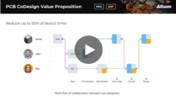
Expand your collaboration skills and stay ahead of the curve with PCB CoDesign. Design teams often grapple with prolonged design cycles and coordination issues, leading to delays and inefficiencies. In the current landscape, design processes are hindered by fragmented collaboration, resulting in increased layout times and difficulties in synchronizing design updates.